RBrowser GPT
To further enhance usability and efficiency, RBrowser GPT leverages artificial intelligence (AI) to facilitate interactive RNA data exploration. This AI-powered assistant provides: Automated Query Assistance – Users can input natural language queries, and RBrowser GPT retrieves relevant RNA datasets and annotations.
Context-Aware Data Interpretation – The AI model analyzes user-selected transcript regions and suggests potential RNA modifications, interactions, and functional annotations. Streamlined Data Navigation – Guides users through multi-layered transcriptome data, improving workflow efficiency and interpretation.
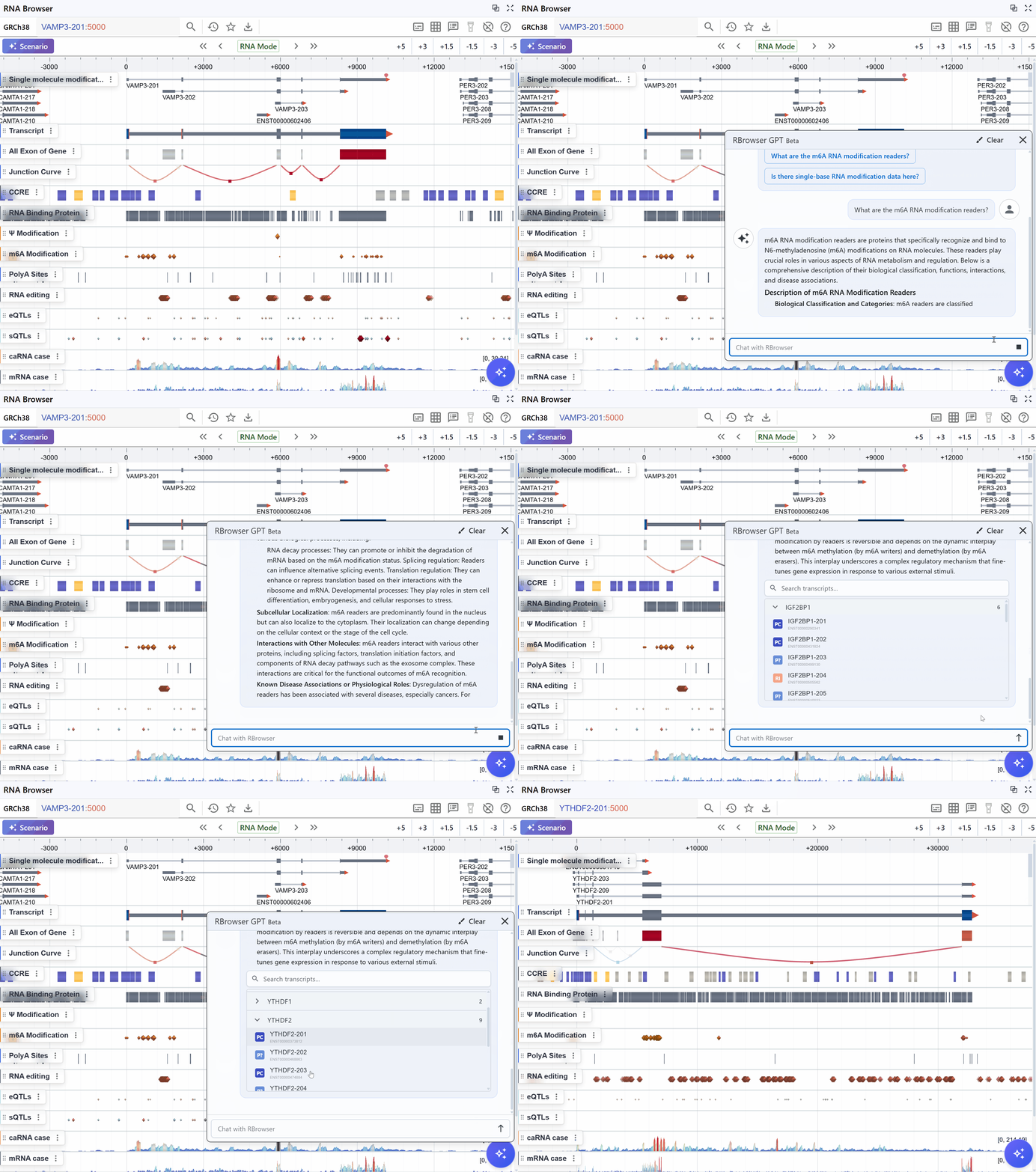
Users can open the RBrowser GPT chat window by clicking the robot icon in the bottom-right corner.
We provide several simple prompt examples for you to choose from.
You can also ask any RNA-related question based on your own research needs.
Example:
When you type a question like What are the RNA modification readers? into the chat box and click the ↑ button to send it to RBrowser GPT, you will receive a brief overview along with a table listing RNA modification readers.
Next, You can click View RBrowser in the Action column, and the current rendering window will jump to the corresponding transcript or gene.
Warning
AI-generated content may contain inaccuracies.
Due to the current state of technology, all generative AI systems cannot guarantee the absolute accuracy of information.