Example: GTEx Expression
typekey/plugin-gtex-expression
A reference plugin that renders a GTEx tissue-expression heatmap for the currently active transcript.
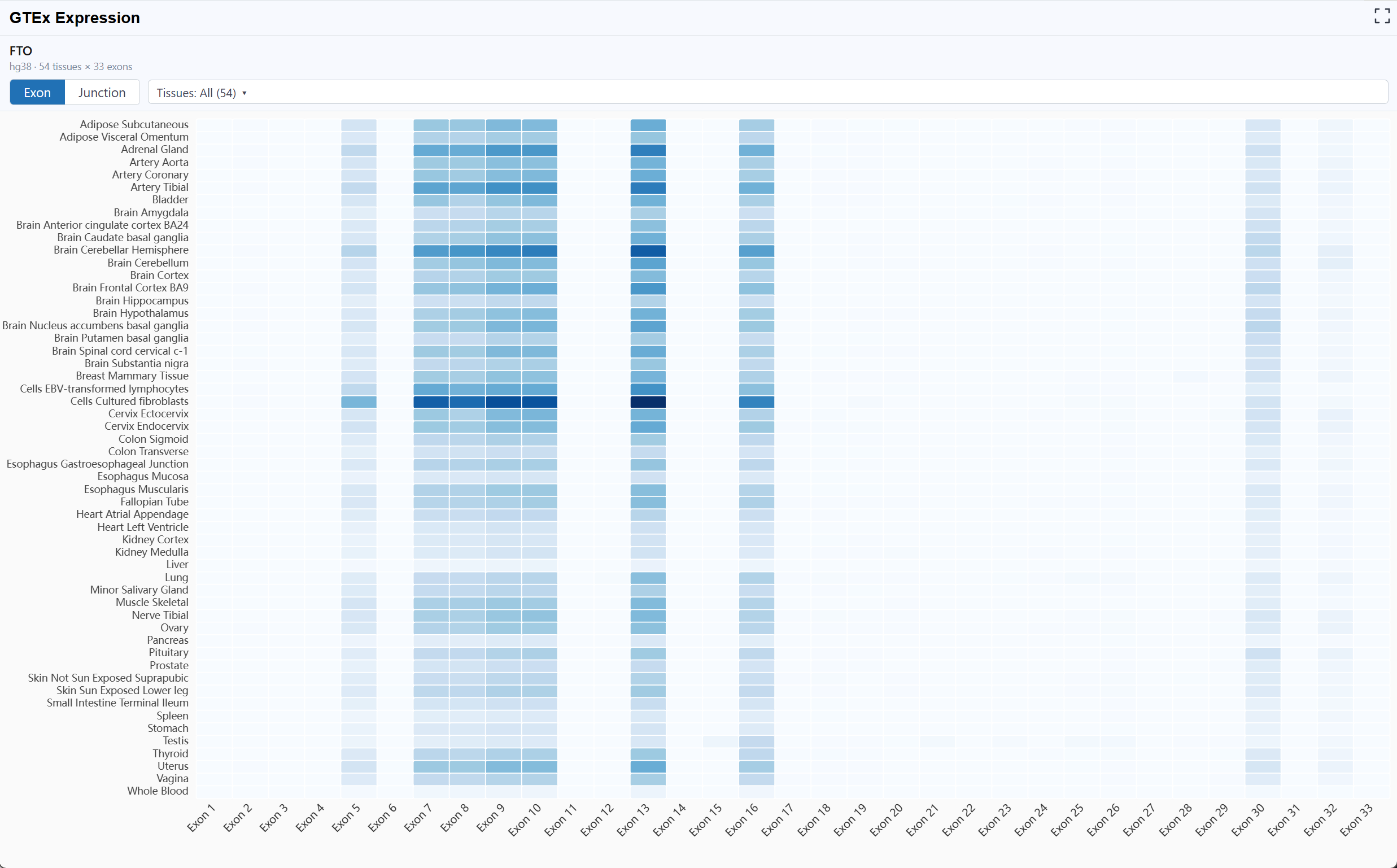
- X axis — Exon id (Exon mode) or Junction id (Junction mode)
- Y axis — GTEx tissue
- Cell value — expression (read count)
The header reads the active transcript from host state (selectedRNA) and the chart auto-fits its container, thinning axis labels based on the available width / height.
What this example demonstrates
- Reading reactive host state with
useSelectedRNA()/useSpecies() - Declaring
state:readas the only requested permission - Bundling a third-party charting library (ECharts) into the plugin
- A self-contained ESM build the host loads as a remote plugin
- Packaging via
rbrowser-plugin packinto a single distributable.rbp
{
  "id": "plugin-gtex-expression",
  "name": "GTEx Expression",
  "version": "0.1.0",
  "apiVersion": "1",
  "minHostVersion": "0.0.1",
  "entry": "./plugins/plugin-gtex-expression/index.js",
  "permissions": ["state:read"],
  "panel": { "position": "right", "title": "GTEx Expression" },
  "author": "RBrowser Core",
  "description": "GTEx tissue expression heatmap (exon / junction) for the active transcript."
}
Data sources
https://api.rbrowser.org/api/v1/exon_expression/<build>/<transcriptId>/auto/https://api.rbrowser.org/api/v1/junction_expression/<build>/<transcriptId>/auto/
GTEx data is human-only — the plugin always queries hg38.
Entry point
import * as ReactDOM from 'react-dom/client'
import { definePlugin } from '@rbrowser/plugin-sdk'
import { RBrowserHostProvider, useSelectedRNA, useSpecies } from '@rbrowser/plugin-sdk/hooks'

let root: ReactDOM.Root | null = null

export default definePlugin({
  activate(host) {
    console.log('[plugin-gtex-expression] activate', host.info)
  },
  render(container, host) {
    if (root) root.unmount()
    root = ReactDOM.createRoot(container)
    root.render(<App host={host} />)
  },
  deactivate() {
    if (root) { root.unmount(); root = null }
  }
})
Build
Built with @rbrowser/plugin-sdk and its companion CLI.
# 1. install deps (React, ECharts, @rbrowser/plugin-sdk)
npm install

# 2. build the ESM bundle  →  dist/index.js
npm run build

# 3. pack into a single .rbp  →  dist/plugin-gtex-expression-<version>.rbp
npm run pack
npm run pack runs vite build then invokes the SDK CLI, which reads manifest.json + dist/index.js and writes dist/plugin-gtex-expression-<version>.rbp. Manual invocation:
npx rbrowser-plugin pack \
  --manifest manifest.json \
  --bundle   dist/index.js \
  --out      dist/plugin-gtex-expression-0.1.0.rbp
Install
A prebuilt .rbp is hosted on the official plugin hub:
All three methods land the panel in the right sidebar, tracking selectedRNA:
- Open RBrowser → click the Plugin Store (puzzle icon) on the left sidebar.
- Drag
plugin-gtex-expression-<version>.rbponto the panel. - The plugin is verified, stored in IndexedDB, and enabled automatically.
- Open RBrowser → Plugin Store → gear icon → Install from URL….
- Paste the hub URL above (or click the Example button to prefill it).
- Download / build a
.rbp(see Build above). - Open RBrowser → Plugin Store → gear icon → Install from local file… and pick the
.rbp.